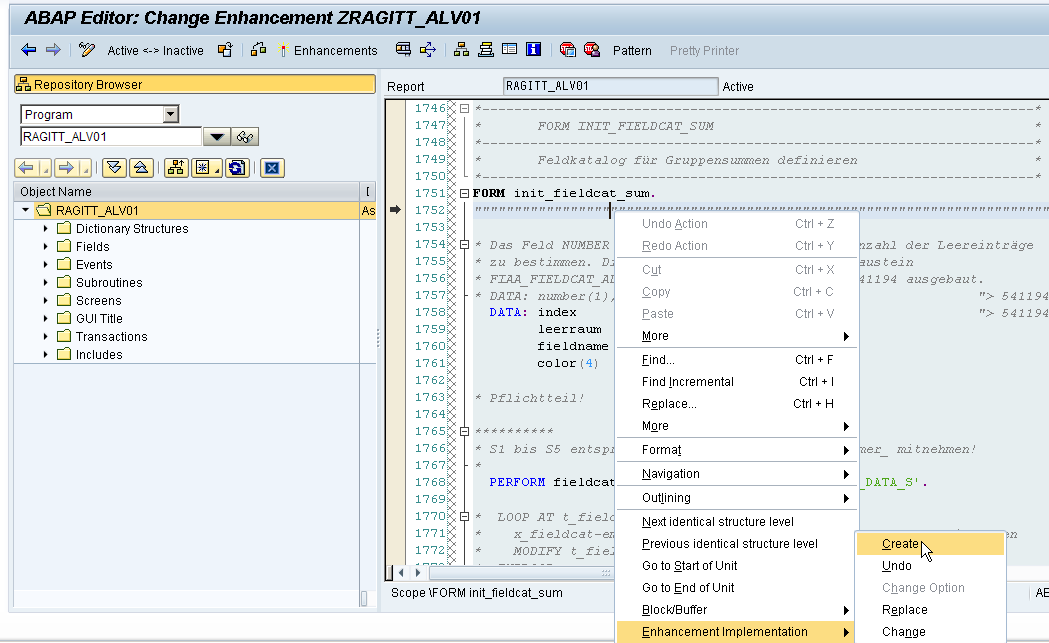
Enhancement Point How To:
1.
Go to SE38 ,
Select Enhancement point (Shift+F4) and select '
Show Implicit Enhancement'
2. On the code select any area that contain
double quote symbol """"""""" , and right click choose
'Enhancement' -- Create.
3. Choose type of Enhancement either '
Declaration' or '
Code'. Normally choose Code.
4. Insert the Enhancement Implementation Name and Short Text .
5. Save and Assign the implementation to the right package and transport number. Done!
Tips:
To find created Enhancement used
SE84 Object Navigator tcode.