Sunday, March 19, 2017

Assign anyr eference type of data to specific attributes


"To assign any data type reference  to specific val


DATA lt_tarikh TYPE zwdselopt.
DATA ls_tarikh TYPE selopt.
FIELD-SYMBOLS:    TYPE INDEX TABLE,
                    TYPE              any,
                  TYPE              char1,
               
                   TYPE              any,
                  TYPE              any.
DATA lt_datum TYPE REF TO data.
ASSIGN lt_datum->* TO .

IF IS ASSIGNED.
  LOOP AT ASSIGNING .
    ASSIGN COMPONENT 'SIGN' OF STRUCTURE TO .
    ASSIGN COMPONENT 'OPTION' OF STRUCTURE TO
    ASSIGN COMPONENT 'LOW' OF STRUCTURE TO .
    ASSIGN COMPONENT 'HIGH' OF STRUCTURE TO .
    ls_tarikh-sign = .
    ls_tarikh-option =
    ls_tarikh-low = .
    ls_tarikh-high = .
    APPEND ls_tarikh TO lt_tarikh.
  ENDLOOP.
ENDIF.

Monday, March 13, 2017

New Line Smartform


Hi,
You can try to use do called dynamic text. First, convert your string to so called ITF Text, something like this:
DATA: l_string TYPE string,
      lt_stream_lines TYPE STANDARD TABLE OF string,
      gt_text TYPE tline_t .

CONCATENATE 'AAAA'
            cl_abap_char_utilities=>newline
            'BBBB'
            cl_abap_char_utilities=>cr_lf
            'CCCC'
            INTO l_string .
APPEND l_string TO lt_stream_lines .

CALL FUNCTION 'CONVERT_STREAM_TO_ITF_TEXT'
  EXPORTING
    stream_lines = lt_stream_lines
    lf           = 'X'
  TABLES
    itf_text     = gt_text.
Then, in the Smartform, set the Text node Type to dynamic text and assign the table with ITF Text:
You should get something like this:
This conversion is especially useful when you have to deal with strings longer than 255 characters (maximum variable output length in Smartforms).
The contents of the dynamic text will be parsed by Smartform Composer during runtime, so you can even include variables (the ones visible in Smartform context) in the string.
cheers
Janis

Copy From : https://archive.sap.com/discussions/thread/3802222

Sunday, January 15, 2017

Radio Button Group By Key, Dynamic Populate


1. Put below code in the WDOINIT.


  DATA l_nd_inf TYPE REF TO if_wd_context_node_info.
  DATA l_nd TYPE REF TO if_wd_context_node.
  DATA l_wa TYPE wdr_context_attr_value.
  DATA lt_wa TYPE TABLE OF wdr_context_attr_value.


"NODE NAME OF THE NODE HAVING THE ATTRIBUTE
  l_nd wd_context->get_child_node'SELECTION' ).              
  l_nd_inf l_nd->get_node_info).

  l_wa-text 'X'.
  l_wa-value 'V1'.
  APPEND l_wa TO lt_wa.

  l_wa-text 'y'.
  l_wa-value 'V2'.
  APPEND l_wa TO lt_wa.

  l_wa-text 'Z'.
  l_wa-value 'V3'.
  APPEND l_wa TO lt_wa.

  l_wa-text 'A'.
  l_wa-value 'V4'.
  APPEND l_wa TO lt_wa.

  l_nd_inf->set_attribute_value_set(
  name 'MODEL' "ATTRIBUTE NAME
  value_set lt_wa
   ).


Output

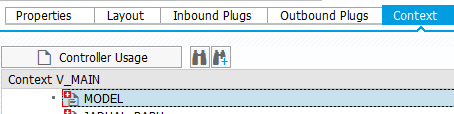
Context View


Layout View


Friday, November 4, 2016

Archivelink Display - ARCHIVOBJECT_DISPLAY


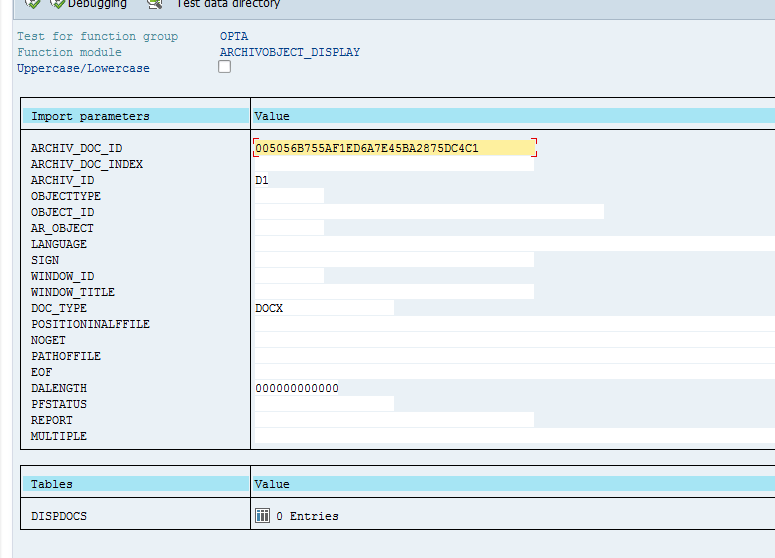
Below is the function to display the archive link directly from the report

ARCHIVOBJECT_DISPLAY

pass below parameter

ARCHIV_DOC_ID
ARCHIV_ID


Wednesday, October 12, 2016

Debugging Web Dynpro in New Debugger Screen


Debugging Web Dynpro


1. Look for Replace  Tool or New Tool Icon
2. Click Special Tools folder and Choose Webdynpro


Friday, September 23, 2016

Class to Create Webdynpro URL


This is the class to construct Webdynpro URL based on the Application Name

  " Obtain the URL  cl_wd_utilities=>construct_wd_urlexporting application_name 'ZHR_EXAMPLE'                                                            in_parameters    lt_parameter
                                                            importing out_local_url    url ).

Thursday, September 22, 2016

Function to get PERNR based on user name


We can use below BADI to get person id or personal number  based on sy-uname


BAPI_USR01DOHR_GETEMPLOYEE