Sunday, January 15, 2017

Radio Button Group By Key, Dynamic Populate


1. Put below code in the WDOINIT.


  DATA l_nd_inf TYPE REF TO if_wd_context_node_info.
  DATA l_nd TYPE REF TO if_wd_context_node.
  DATA l_wa TYPE wdr_context_attr_value.
  DATA lt_wa TYPE TABLE OF wdr_context_attr_value.


"NODE NAME OF THE NODE HAVING THE ATTRIBUTE
  l_nd wd_context->get_child_node'SELECTION' ).              
  l_nd_inf l_nd->get_node_info).

  l_wa-text 'X'.
  l_wa-value 'V1'.
  APPEND l_wa TO lt_wa.

  l_wa-text 'y'.
  l_wa-value 'V2'.
  APPEND l_wa TO lt_wa.

  l_wa-text 'Z'.
  l_wa-value 'V3'.
  APPEND l_wa TO lt_wa.

  l_wa-text 'A'.
  l_wa-value 'V4'.
  APPEND l_wa TO lt_wa.

  l_nd_inf->set_attribute_value_set(
  name 'MODEL' "ATTRIBUTE NAME
  value_set lt_wa
   ).


Output

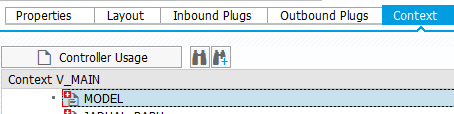
Context View


Layout View


Friday, November 4, 2016

Archivelink Display - ARCHIVOBJECT_DISPLAY


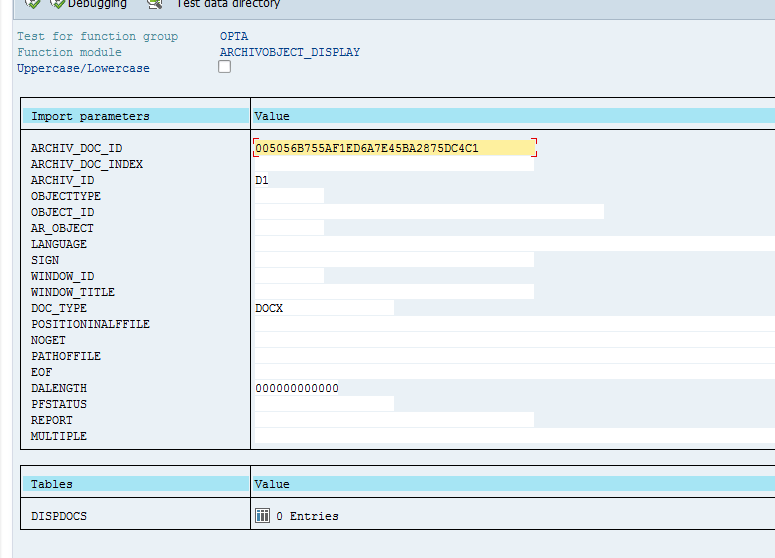
Below is the function to display the archive link directly from the report

ARCHIVOBJECT_DISPLAY

pass below parameter

ARCHIV_DOC_ID
ARCHIV_ID


Wednesday, October 12, 2016

Debugging Web Dynpro in New Debugger Screen


Debugging Web Dynpro


1. Look for Replace  Tool or New Tool Icon
2. Click Special Tools folder and Choose Webdynpro


Friday, September 23, 2016

Class to Create Webdynpro URL


This is the class to construct Webdynpro URL based on the Application Name

  " Obtain the URL  cl_wd_utilities=>construct_wd_urlexporting application_name 'ZHR_EXAMPLE'                                                            in_parameters    lt_parameter
                                                            importing out_local_url    url ).

Thursday, September 22, 2016

Function to get PERNR based on user name


We can use below BADI to get person id or personal number  based on sy-uname


BAPI_USR01DOHR_GETEMPLOYEE


Tuesday, June 7, 2016


Debug Workflow Method


1.  Add below code to enable infinite loop

* Temporary, for debugging.
  DATAlv_tmp(1).
  lv_tmp 'X'.
  WHILE lv_tmp EQ 'X'.
  ENDWHILE.


2. Run the program.

3. GO to T-CODE SM50 amd check your program name  and user WF-BATCH.


4. Select Administration --Program--Debugging to start the debug process