Wednesday, June 23, 2021

Adobe Forms Tips and Tricks - From SCN Members


Source:  https://blogs.sap.com/2017/09/27/sap-adobe-form-tips-and-tricks/

This blog is about tips and tricks and not about describing how something works.

1st tip is to have some calming substance nearby – you will need it. 🙂 (Something your country and company policy allows of course…)

2nd tip – Adobe form has serious caching issues. Anything you do might or might not be saved and activated. Keep this in mind during testing. If something doesn’t work but it should that is possibly not your fault – caching got you. Some caching problems can be negated by using FM IQS1_REFRESH_ALL. This FM will delete some of the cache Adobe Form is using but not all!!! So if something still doesn’t work that can be still a caching issue. You can try to make a big change to the form, interface, and activate them again. This is the last thing I can recommend if that doesn’t work then you can ask basis to restart the server. 🙁

3rd tip – Adobe form links data to the individual elements in a very time-consuming way. And this link can be easily wiped during repositioning of the elements. So during repositioning be very careful what you are doing. Perform all logic in the interface before you call the form. Put your data into nicely named fields/structures/tables. Never count on the link. The link might be there or not. Don’t use the import structures/tables. Copy your data instead to global data and link those. If the link is gone you can relink the whole thing a lot more easily.

4th tip – Adobe form performs checks on the context data. These checks are not performed on the import data. SAP has set up a few import data structures that will immediately break the Adobe form if they are moved to the context data. Break means short dump. If you experiencing a short dump during development this might be the reason. Your global structures need to be correct. For example, unit and currency field dependencies cannot point outside of the structure.

5th tip – Translation works. Sometimes it doesn’t – because translation is cached too. If the translation doesn’t work you can run a program that wipes the template cache. The program is FP_PDF_TEST_26. You can disable template cache to avoid the problem altogether see OSS note 2258036.

If you have more tips and tricks leave a comment. I check and put them into the post.


User Comment

Thanks for the tip with the translation cache. I experienced this error tons of times. My solution so far was to do a dummy change on the layout, add the translation to the transport manually and import the TA. Your solution seems more comfortable

Wednesday, February 7, 2018

Webdynpro Run Time Analysis - SAT / SE30


I.  How to create a performance trace for a Web Dynpro Application:
1.     Please create a new variant in transaction SE30 (WEBDYNPRO for example).
2.     Go to the corresponding service of your application in SICF and start the performance analysis (Edit menu → Runtime analysis → Activate): select variant (WEBDYNPRO), choose "High" for the measurement precision and "Single entries" for the processing.
3.     Start application and recreate the steps where the performance problem facing.
4.     Deactivate the performance analysis (Edit menu → Runtime analysis → Deactivate)

II.  To evaluate the trace within transaction SE30 or SAT:
1.     Go to the tab 'Evaluate'.
2.     Select from the table the measurement with the highest 'runtime' value 3.  Double-click it
4.     Go to tab 'Hit list'
5.     Sort in decreasing order the results by 'Net (microsec)' time
6.     The Statements/events in the top rows would take up the most time by the application.


Reference :
https://launchpad.support.sap.com/#/notes/2327539

Monday, September 25, 2017

How to run Webdynpro directly to SAP GUI?


1. Create t-code through SE93 with below configuration,  choose Transaction with parameters


2. Assign transaction WDYID, Skip Intial Screen .

3. Put below parameters in Screen Field Value

Name of Screen Field        Value

APPLICATION              ZWD_APP_NAME
STARTMODE                GUI

Thursday, September 7, 2017

How to Read Class or Object with Multiple Reference ??


  1. We need to read the ZCX_EXCEPTION reference in the code.
  2. zcx_exception TYPE REF TO lcx_exception.
  3. DATAexc    TYPE REF TO cx_root,
  4. CATCH lcx_exception INTO zcx_exception.
    exc ?=  zcx_exception" Take CX_ROOT INSTANCE
  5. Above is the way to read CX_ROOT value in the ZCX_EXCEPTION to EXC reference.
  6.  textid exc-textid.
  7. zcx_exception-text . Reading local class value.


Monday, September 4, 2017

Upload to AL 11 through Webdynpro


method onactionupload2 .

  data lo_el_context type ref to if_wd_context_element.
  data ls_context type wd_this->element_context.
  data lv_zraw type wd_this->element_context-zraw.

*   get element via lead selection
  lo_el_context wd_context->get_element).
*   @TODO handle not set lead selection
  if lo_el_context is initial.
  endif.

*   get single attribute
  lo_el_context->get_attribute(
    exporting
      name =  `ZRAW`
    importing
      value lv_zraw ).

  data :
    l_fname   type string ,
    lv_x      type x,
    lv_string type string.
  lv_x lv_zraw.
  l_fname '/ECD/RAHSIAXSTRING2.PGP'.

  datalit_binary_content type solix_tab.

  call function 'SCMS_XSTRING_TO_BINARY'
    exporting
      buffer     lv_zraw
*     APPEND_TO_TABLE       = ' '
* IMPORTING
*     OUTPUT_LENGTH         =
    tables
      binary_tab lit_binary_content.

  .

  open dataset l_fname for output in binary mode .

  loop at lit_binary_content assigning field-symbol().
    transfer -line to l_fname.
  endloop.

  close dataset l_fname.


endmethod.
 

Sunday, March 19, 2017

Assign anyr eference type of data to specific attributes


"To assign any data type reference  to specific val


DATA lt_tarikh TYPE zwdselopt.
DATA ls_tarikh TYPE selopt.
FIELD-SYMBOLS:    TYPE INDEX TABLE,
                    TYPE              any,
                  TYPE              char1,
               
                   TYPE              any,
                  TYPE              any.
DATA lt_datum TYPE REF TO data.
ASSIGN lt_datum->* TO .

IF IS ASSIGNED.
  LOOP AT ASSIGNING .
    ASSIGN COMPONENT 'SIGN' OF STRUCTURE TO .
    ASSIGN COMPONENT 'OPTION' OF STRUCTURE TO
    ASSIGN COMPONENT 'LOW' OF STRUCTURE TO .
    ASSIGN COMPONENT 'HIGH' OF STRUCTURE TO .
    ls_tarikh-sign = .
    ls_tarikh-option =
    ls_tarikh-low = .
    ls_tarikh-high = .
    APPEND ls_tarikh TO lt_tarikh.
  ENDLOOP.
ENDIF.

Monday, March 13, 2017

New Line Smartform


Hi,
You can try to use do called dynamic text. First, convert your string to so called ITF Text, something like this:
DATA: l_string TYPE string,
      lt_stream_lines TYPE STANDARD TABLE OF string,
      gt_text TYPE tline_t .

CONCATENATE 'AAAA'
            cl_abap_char_utilities=>newline
            'BBBB'
            cl_abap_char_utilities=>cr_lf
            'CCCC'
            INTO l_string .
APPEND l_string TO lt_stream_lines .

CALL FUNCTION 'CONVERT_STREAM_TO_ITF_TEXT'
  EXPORTING
    stream_lines = lt_stream_lines
    lf           = 'X'
  TABLES
    itf_text     = gt_text.
Then, in the Smartform, set the Text node Type to dynamic text and assign the table with ITF Text:
You should get something like this:
This conversion is especially useful when you have to deal with strings longer than 255 characters (maximum variable output length in Smartforms).
The contents of the dynamic text will be parsed by Smartform Composer during runtime, so you can even include variables (the ones visible in Smartform context) in the string.
cheers
Janis

Copy From : https://archive.sap.com/discussions/thread/3802222

Sunday, January 15, 2017

Radio Button Group By Key, Dynamic Populate


1. Put below code in the WDOINIT.


  DATA l_nd_inf TYPE REF TO if_wd_context_node_info.
  DATA l_nd TYPE REF TO if_wd_context_node.
  DATA l_wa TYPE wdr_context_attr_value.
  DATA lt_wa TYPE TABLE OF wdr_context_attr_value.


"NODE NAME OF THE NODE HAVING THE ATTRIBUTE
  l_nd wd_context->get_child_node'SELECTION' ).              
  l_nd_inf l_nd->get_node_info).

  l_wa-text 'X'.
  l_wa-value 'V1'.
  APPEND l_wa TO lt_wa.

  l_wa-text 'y'.
  l_wa-value 'V2'.
  APPEND l_wa TO lt_wa.

  l_wa-text 'Z'.
  l_wa-value 'V3'.
  APPEND l_wa TO lt_wa.

  l_wa-text 'A'.
  l_wa-value 'V4'.
  APPEND l_wa TO lt_wa.

  l_nd_inf->set_attribute_value_set(
  name 'MODEL' "ATTRIBUTE NAME
  value_set lt_wa
   ).


Output

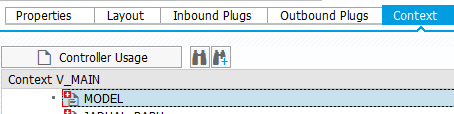
Context View


Layout View


Friday, November 4, 2016

Archivelink Display - ARCHIVOBJECT_DISPLAY


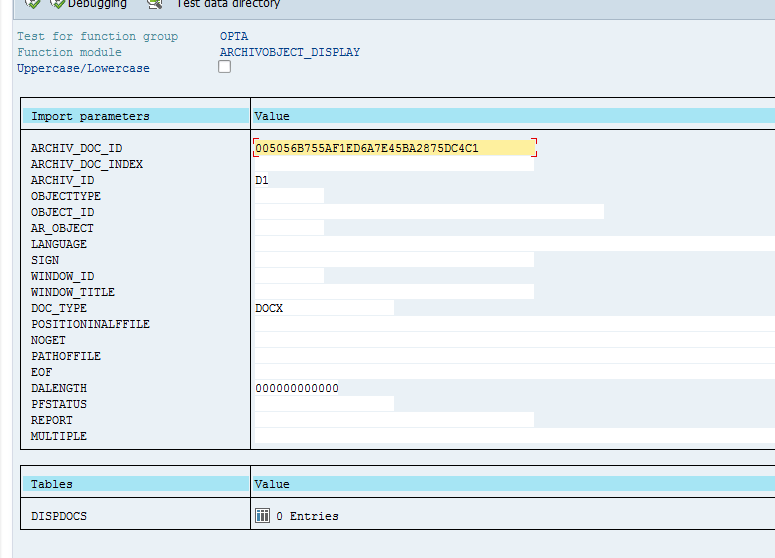
Below is the function to display the archive link directly from the report

ARCHIVOBJECT_DISPLAY

pass below parameter

ARCHIV_DOC_ID
ARCHIV_ID


Wednesday, October 12, 2016

Debugging Web Dynpro in New Debugger Screen


Debugging Web Dynpro


1. Look for Replace  Tool or New Tool Icon
2. Click Special Tools folder and Choose Webdynpro


Friday, September 23, 2016

Class to Create Webdynpro URL


This is the class to construct Webdynpro URL based on the Application Name

  " Obtain the URL  cl_wd_utilities=>construct_wd_urlexporting application_name 'ZHR_EXAMPLE'                                                            in_parameters    lt_parameter
                                                            importing out_local_url    url ).

Thursday, September 22, 2016

Function to get PERNR based on user name


We can use below BADI to get person id or personal number  based on sy-uname


BAPI_USR01DOHR_GETEMPLOYEE


Tuesday, June 7, 2016


Debug Workflow Method


1.  Add below code to enable infinite loop

* Temporary, for debugging.
  DATAlv_tmp(1).
  lv_tmp 'X'.
  WHILE lv_tmp EQ 'X'.
  ENDWHILE.


2. Run the program.

3. GO to T-CODE SM50 amd check your program name  and user WF-BATCH.


4. Select Administration --Program--Debugging to start the debug process 

Friday, January 29, 2016

Editing Standard Program or Class but error ? you cannot perform this action in modification/enhancement mode


  1. Try to edit standard class/program that you had created but got below error 

    you cannot perform this action in modification/enhancement mode

  2. But how to fix it even access key already created to edit the program or class?
  3. You need to turn off the modification assistants 
  4. Edit - Modification Operations - Switch Off Assistants 


Tuesday, December 8, 2015

Getting xstring value from Source / URL


Code snippet to get Xstring value from source file either URL or Path File


DATA lr_mime_repository TYPE REF TO if_mr_api.
  
"
  
" Variables
  
DATA lv_img_xstring TYPE xstring.

  
SELECT SINGLE zparam_val1 FROM zett_value
  
INTO gv_img_source
  
WHERE zformtyp 'ED03'
    
AND zparam_id1 'PATH'
    
AND zparam_id2 'NOPHOTO'.


TRY.
      
"MIME repository reference
      lr_mime_repository 
cl_mime_repository_api=>get_api( ).

      
"Get file from MIME
      
CALL METHOD lr_mime_repository->get
        
EXPORTING
          i_url             
gv_img_source
          i_check_authority 
' '
        
IMPORTING
          e_content         
lv_img_xstring.

    
CATCH cx_root.
  
ENDTRY.

  
"Return binary representation of file
  gv_image_default 
lv_img_xstring.

Thursday, July 30, 2015

SAPSCRIPT BOX


Simple Box

/: BOX FRAME 10 TW

You can use the POSITION and SIZE commands to set default parameters for a box.

You can write:

/: POSITION XORIGIN '11.21' YORIGIN '5.31' MM 
/: SIZE HEIGHT '2' MM WIDTH '76' MM 
/: BOX FRAME 10 TW INTENSITY 10


This can be useful if you gave several boxes that share the same parameters.

If you want to set the position relatively to the window use POSITION WINDOW
to set the position to the top/left start of the window. Then use POSITION
to set the current position relatively to the start of the Window.

Note that you uses "+" or "-" in the ORIGIN position to the set the position relatively.

/: POSITION WINDOW 
/: POSITION XORIGIN '+5' MM YORIGIN '+10' MM


the position is now 5 MM from the left and 10 MM from the top of the window

Drawing a line. You can draw a line by setting the Height or Widths to 0
and add a frame. E.g. a horizontal line:

/: SIZE HEIGHT '0' MM WIDTH '200' MM

https://pijush.wordpress.com/2007/05/08/to-print-the-total-in-a-sapscript/

Monday, April 27, 2015

ABAP Report - Program Structure or Template


2
3
4
5
6
7
8
9
10
11
12
13
14
15
16
17
18
19
20
21
22
23
24
25
26
27
28
29
30
31
32
33
34
35
36
37
38
39
40
41
42
43
44
45
46
47
48
49
50
51
52
53
54
55
56
57
58
59
60
61
62
63
64
65
66
67
68
69
70
71
72
73
74
75
76
77
78
************************************************************************
* Program Name:
* Author:
* Creation Date:
* Description:
* Quality check:
*----------------------------------------------------------------------*
*======================================================================*
* Change History Log
*----------------------------------------------------------------------*
* Date | Change ID | Name | Description | Initials
*----------------------------------------------------------------------*
*
************************************************************************
 
REPORT
 
*-----------------------------------------------------------------------
* TABLE DEFINITIONS
*-----------------------------------------------------------------------
* TABLES: example.
 
*-----------------------------------------------------------------------
* TYPES DEFINITIONS
*-----------------------------------------------------------------------
* TYPES: BEGIN OF texample,
* example TYPE c,
* END OF texample.
 
*-----------------------------------------------------------------------
* TABLE TYPE DEFINITIONS
*-----------------------------------------------------------------------
* TYPES: ttexample TYPE STANDARD TABLE OF texample.
 
*-----------------------------------------------------------------------
* DATA - WORKING FIELDS
*-----------------------------------------------------------------------
* DATA: example TYPE c.
 
*-----------------------------------------------------------------------
* DATA - CONSTANTS
*-----------------------------------------------------------------------
* CONSTANTS:
 
*-----------------------------------------------------------------------
* SELECTION SCREEN
*-----------------------------------------------------------------------
* SELECTION-SCREEN BEGIN OF BLOCK SCR WITH FRAME.
* PARAMETERS: p_example TYPE CHAR255.
* SELECTION-SCREEN END OF BLOCK SCR.
 
************************************************************************
************************** MAIN PROGRAM ********************************
************************************************************************
 
*-----------------------------------------------------------------------
* INITIALIZATION.
*-----------------------------------------------------------------------
 
*-----------------------------------------------------------------------
* AT SELECTION-SCREEN.
*-----------------------------------------------------------------------
 
*-----------------------------------------------------------------------
* AT SELECTION-SCREEN ON VALUE-REQUEST FOR p_example.
*-----------------------------------------------------------------------
 
*-----------------------------------------------------------------------
* START-OF-SELECTION.
*-----------------------------------------------------------------------
 
*-----------------------------------------------------------------------
* END-OF-SELECTION.
*-----------------------------------------------------------------------
 
************************************************************************
************************** SUBROUTINES *********************************
************************************************************************